Cockpit vs Webmin vs HeadlessOS: Linux Server GUIs Compared
Cockpit and Webmin run a web panel on every server. HeadlessOS runs on your computer and connects over SSH. How they differ, and which one to pick.
If you look after a VPS, a few cloud servers or a home lab, sooner or later you want something better than scrolling through docker ps and systemctl status output. The two best-known answers are Cockpit and Webmin: free, open-source web panels that you install on the server and open in a browser. HeadlessOS takes a different approach. It’s a desktop app on your own computer that connects over SSH, and it installs nothing on the server.
This post compares the three, plus a few other tools people reach for: Portainer, SSH clients and monitoring stacks. We build HeadlessOS, so we’re not neutral. We’ve tried to be fair, to say plainly where Cockpit and Webmin do things HeadlessOS doesn’t, and to link each claim about another project to its own docs.
The short answer
- Choose Cockpit if you run Fedora, RHEL or another distribution that ships it, and you want the vendor-supported web console with storage, networking, Podman containers and virtual machines.
- Choose Webmin if you need to configure a lot of server software through forms (Apache, BIND, Postfix, Samba and many more), or you host websites with Virtualmin.
- Choose HeadlessOS if you’d rather not install or open anything on your servers, you manage several servers from one place, or you work mostly with Docker.
You can also mix them. HeadlessOS only uses SSH, so it runs happily next to Cockpit or Webmin on the same server.
The real difference: where the software runs
Most of the differences between these tools follow from one design choice: does the management software run on the server, or on your computer?
Cockpit: a web console on each server
Cockpit is sponsored by Red Hat, and in RHEL it’s simply called “the web console”. You install the cockpit package on each server, and systemd starts it when someone connects to port 9090. You sign in with the server’s own user accounts. It comes preinstalled on Fedora Server and is packaged for Debian, Ubuntu, Arch, openSUSE and others (install guide).
Cockpit covers the operating system itself very well: logs, services, user accounts, storage (including LVM and RAID), networking, software updates, a terminal, Podman containers and libvirt virtual machines.
Two changes are worth knowing about if you’re following an older guide:
- Docker support was dropped. The Docker page was deprecated in Cockpit 215 in favour of Podman.
- Managing several machines from one login is deprecated. Red Hat’s RHEL 10 documentation says the host switcher is off by default and “cannot be secure” because of limits in web browsers. The recommended setup is one host per browser session, or Cockpit Client.
Cockpit Client is the closest thing to the HeadlessOS model. It’s an app that connects over SSH, and since Cockpit 295 it can manage a server with no Cockpit packages installed, as long as the server has Python. It’s distributed as a Flatpak, so it runs on Linux desktops only.
Webmin: a control panel for nearly everything
Webmin has been around since 1997. It’s written in Perl and runs its own small web server on port 10000. You add its package repository with a setup script, then install the webmin package with apt or dnf (download page).
Webmin’s strength is breadth. Besides users, cron jobs, packages, the firewall and logs, it has modules for a long list of server software: Apache, BIND DNS, Postfix and Dovecot, MySQL and PostgreSQL, Samba and more. Virtualmin, which is built on Webmin, is a complete web-hosting control panel. If you want forms for config files you would otherwise edit by hand, nothing else in this comparison comes close.
Webmin can also manage other servers through its cluster modules, but each of those servers runs Webmin too. There’s no Docker module in Webmin itself; community modules fill that gap.
HeadlessOS: a desktop on your computer, SSH to the server
HeadlessOS runs on your own machine: as a desktop app for Windows and macOS, or from source on any system with Node.js. You add a server with its address and SSH login, and HeadlessOS shows it as a desktop, with windows, a dock and apps: Dashboard, File Explorer, Terminal, Docker, Services, Task Manager and Server Admin.
Behind each app are the commands you’d type yourself: df, free, ps, docker ps, systemctl. HeadlessOS runs them over SSH, parses the output and draws it as a UI. Files go over SFTP. Nothing is installed on the server, no daemon keeps running there, and no port is opened besides SSH. If you can ssh into the box, HeadlessOS can manage it.
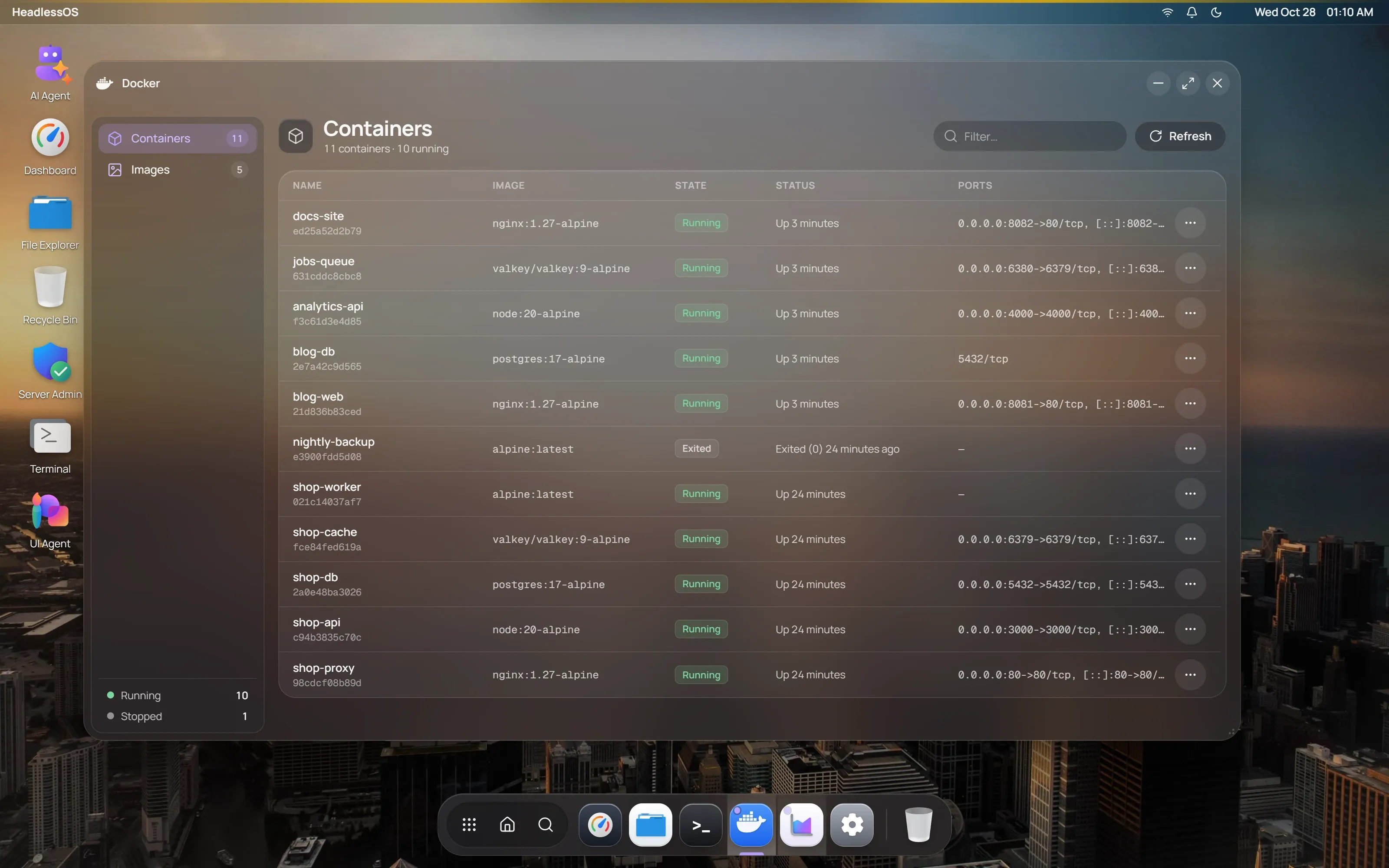
Because the app runs on your computer, several servers are simply several sessions in one window. The Fleet overview shows all of them at once, and you switch between servers the way you’d switch desktops.
AI features are optional. With an OpenAI or Claude key, or a local model through Ollama, you can ask for something like “show me the containers using the most memory”, and the UI Agent builds a view from your server’s real output. The agents can’t type shell commands. They call a fixed set of typed actions, anything that would change a server waits for your approval, and secrets are removed from server output before a model sees it. Without a key, every other app works exactly the same.
HeadlessOS is newer and narrower than the other two. It doesn’t manage disks, network configuration or virtual machines, and it has no forms for DNS or mail servers. For those jobs, you’d use its terminal and code editor.
Side by side
| HeadlessOS | Cockpit | Webmin | |
|---|---|---|---|
| Runs on | Your computer | Each server | Each server |
| Installed on the server | Nothing | cockpit package | webmin package and Perl |
| Port to open | None besides SSH | 9090 | 10000 |
| How you use it | Desktop app, or from source | Browser | Browser |
| Several servers | One window, with a fleet overview | One host per login | Cluster modules, with Webmin on each server |
| Docker | Containers, images, files inside containers, shells | Podman only | Community modules |
| Disks, networking, VMs | No | Yes | Disks and networking |
| Forms for server software | No | Limited | Many |
| Works from a phone | No | Yes | Yes |
| Licence | MIT | LGPL | BSD |
| Price | Free | Free | Free |
Security: what each one exposes
Any web panel on a server is one more network service to patch, firewall and protect from password guessing. Cockpit and Webmin are mature and actively maintained, and both are fine when you follow the usual advice: keep them updated, allow port 9090 or 10000 only from addresses you trust, and use strong passwords or two-factor sign-in.
A good habit if you use either of them is to not open the port at all, and reach it through SSH instead:
ssh -L 9090:localhost:9090 you@your-server# then open https://localhost:9090 on your computerHeadlessOS builds the whole tool around that idea. The only thing listening on the server is the SSH daemon you already run and harden. On your computer, the app listens only on localhost, every request needs a token created for your install, and saved passwords are encrypted on disk. The trade-off is that your computer now holds those logins, so protect it the way you’d protect your ~/.ssh folder.
Resource use on a small VPS
On a VPS with 1 GB of memory, every process that stays running counts.
- Cockpit is socket-activated: systemd starts it when you connect, so it isn’t running while nobody uses it.
- Webmin runs its web server all the time, waiting on port 10000.
- HeadlessOS runs nothing on the server between commands. While an app is open, it runs short commands on a refresh timer, so you’ll see brief
psordfprocesses, and nothing at all once you close the app.
Other tools people compare
Portainer is excellent for Docker and Kubernetes, and only for those. Its server runs as a container, and each extra Docker host runs the Portainer Agent (on port 9001) or the Edge Agent. If containers are all you manage and your team works in a browser, it’s a strong choice. HeadlessOS covers Docker without an agent, next to the rest of the server.
SSH clients with a file pane, such as Termius, MobaXterm, or PuTTY with WinSCP, also need nothing on the server. They give you a terminal and file transfer, but you still read docker ps and systemctl output yourself. HeadlessOS keeps a real terminal and adds the dashboards around it.
Monitoring stacks like Netdata, or Prometheus with Grafana, are the right tools for history, alerts and graphs across many machines. They’re built for watching rather than managing, and each server runs an agent or exporter.
Which one should you use?
- One or two RHEL, Fedora or CentOS Stream servers at work: Cockpit. Your vendor supports it, and it may already be installed.
- Web hosting, mail or DNS servers that you configure through forms: Webmin, with Virtualmin for hosting.
- A handful of VPSes across providers, a home lab, or servers you aren’t allowed to change: HeadlessOS. Add them with their SSH login and you’re done.
- Mostly Docker, with a team that lives in the browser: Portainer. Or HeadlessOS, if you also want the rest of the server in the same place.
Frequently asked questions
Is HeadlessOS an alternative to Cockpit?
For day-to-day work, yes: checking health, managing services and processes, files, Docker, users and logs. It doesn’t replace Cockpit’s pages for storage, networking and virtual machines.
Can I use Cockpit without installing it on the server?
Yes, with Cockpit Client, a Flatpak app for Linux desktops. The server needs SSH and Python. From Windows or macOS, the usual route is to install Cockpit on the server and open it in a browser.
Do I need to install anything on my server to use HeadlessOS?
No. You need SSH access with a password or a key, and the usual command-line tools. The Docker app needs Docker on the server, and the Services app needs systemd.
Does HeadlessOS work on Windows, macOS and Linux?
The desktop app is available for Windows and macOS. On Linux, you can run it from source with Node.js. The servers you manage can run any common Linux distribution.
Is HeadlessOS free?
Yes. It’s open source under the MIT licence. The AI features use your own OpenAI or Claude key, or a free local model through Ollama, and they’re optional.
Try it
HeadlessOS is free and takes a few minutes to set up. Download it for Windows or macOS, or follow the Quick Start to run it from source. Add a server with its SSH login, and you’ll see it as a desktop.